

A certificate chain problem occurs when a client cannot establish an acceptable trust path for the certificate it receives. That is a different question from whether the hostname matches or the website certificate is still within its dates. Begin with the exact error and the affected client rather than treating every HTTPS failure as an incomplete chain.
Three roles in a trust path
- The leaf certificate identifies the website endpoint.
- Intermediate CA certificates connect that certificate to a trust anchor through issuer signatures.
- A root or other trust anchor is trusted under the client’s own policy.
The client must build and validate an acceptable path, not merely count the certificates returned. OpenSSL’s verification documentation explains trust anchors and path validation.
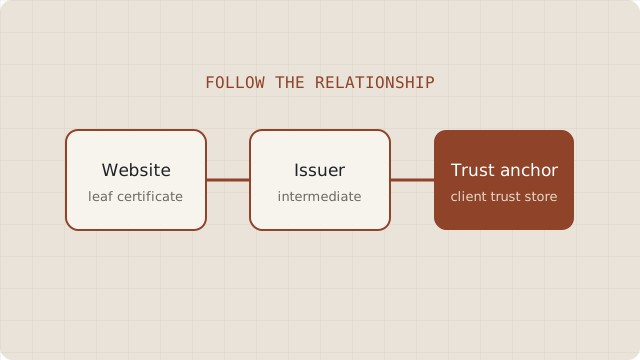
For a normal public website, configure the server to send its leaf and the appropriate intermediate certificates. The root is normally already represented by the client’s trust store and need not be sent. Sending a root cannot make an untrusted root trusted. The TLS specification describes certificate-message ordering and omitted trust anchors.
Capture the client context
Record the exact hostname, error, time, browser or application version, and whether the issue affects other current clients. Confirm that the client reaches the intended endpoint. With a CDN, determine whether the error concerns the browser-to-edge connection or the separate origin connection.
Check the served leaf’s names and dates too. A mismatch or expired leaf will not be repaired merely by adding intermediates. If an older application fails while current browsers succeed, preserve that distinction; it helps identify the relevant compatibility requirement.
Inspect what the endpoint sends
With OpenSSL installed, this optional read-only example requests the certificate list and performs configured verification. Replace demo.test throughout with the same hostname of a site you manage. The reserved example is illustrative and will not normally resolve publicly; it is not a public certificate target.
openssl s_client -connect demo.test:443 -servername demo.test -showcerts -verify_hostname demo.test -verify_return_error-showcerts shows the list sent by the server, not a verified chain. Read the verification output separately and stop the session with Ctrl+C. The command manual describes these behaviors. OpenSSL’s configured trust store and verification behavior can differ from a browser’s. A failure can reflect the local setup; a success is not a complete pass for every client.
Classify the evidence before repairing
- A required intermediate is absent: compare the server’s configured bundle with the CA’s documented chain for that leaf.
- The bundle is unrelated or out of date: obtain the appropriate chain from the issuing CA or managed provider.
- A client lacks a suitable trust anchor: review supported platform updates and the CA’s compatibility guidance.
- An organizational proxy changes the connection: involve the administrator responsible for that network’s trust policy.
Let’s Encrypt publishes its chains, while its compatibility documentation distinguishes platform trust and server configuration. Use the equivalent official material for your issuer. Do not fetch a random certificate bundle from a forum or ask visitors to trust an arbitrary root.
Deploy the correction and recheck
Have the authorized operator install the documented certificate bundle through the platform’s supported process. The required file format and activation step vary, so avoid a universal replacement or restart command. Check every serving node or managed endpoint affected by the change.
Revisit the original failing client, then representative supported clients. Record the served leaf, supporting chain and resulting error or success. If only an unsupported legacy client remains affected, make a documented compatibility decision instead of silently weakening validation. Add chain deployment to renewal verification so the same omission does not return with the next certificate.